Leafy Corner How to Complete Orders
Turn structured customer requests into reputation and tokens once the order board unlocks.
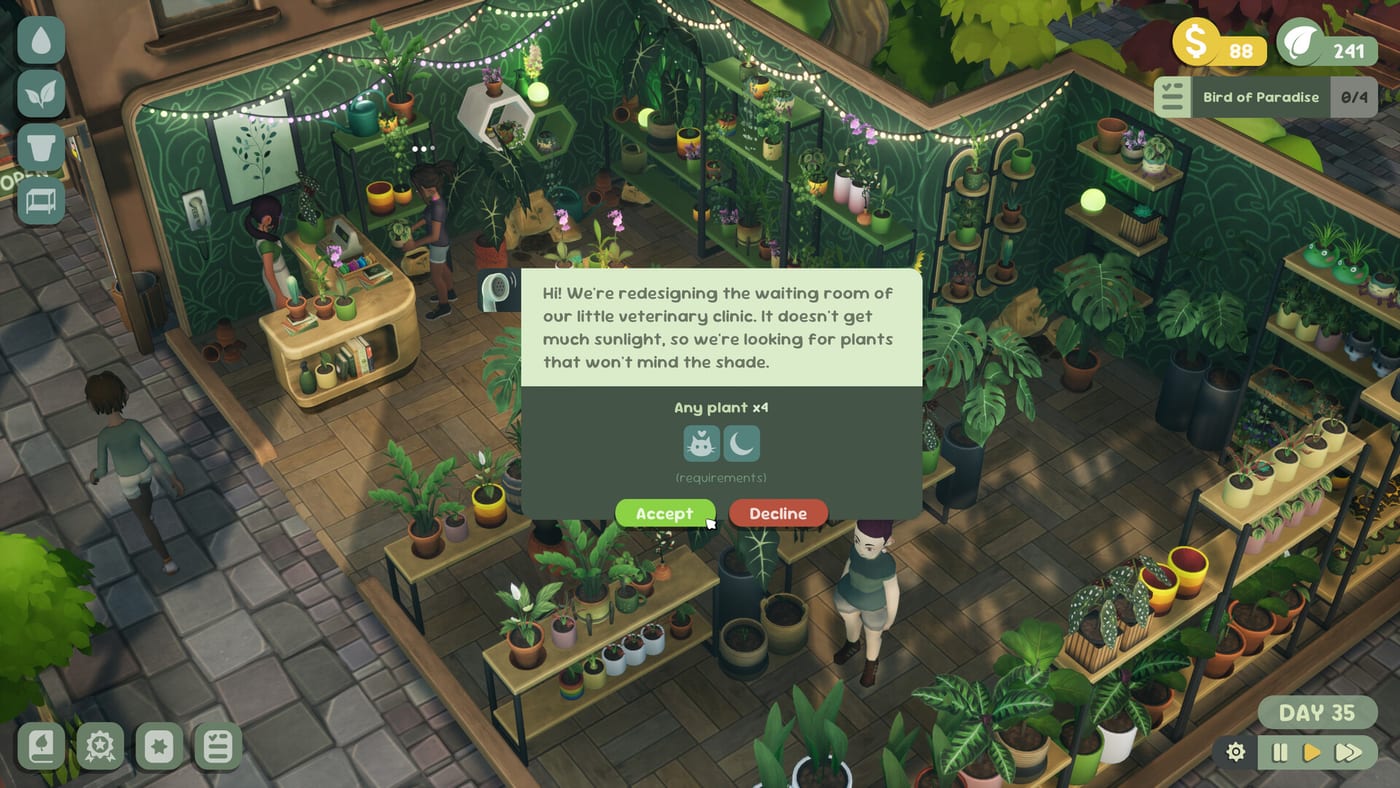
Orders are the cozy endgame of demo progression
Customer orders in Leafy Corner are structured requests—specific plant traits, pot colors, or care profiles—that appear after your shop reputation climbs high enough. Playtest and demo footage consistently places the order board around reputation level 3, after you have practiced casual browsing via How to Help Customers and stabilized watering with How to Water Plants. Patch 1.0.3 (August 2, 2026) adds an important gate: orders requiring the Trailing attribute no longer appear before reputation level 4—see Trailing Plants and Patch 1.0.3. Orders are not timed raids or failure states; they are gentle objectives that reward Plant Tokens and reputation when you deliver the right pot.
The Steam demo teases the order loop without letting every player finish a full chain—some builds stop just before level 3 to keep the thirty-minute slice focused. Launch on July 30, 2026 at $9.99 opens the complete system across Steam, Switch, PS5, and Xbox. Use this guide so day-one orders feel familiar, not mysterious.
How orders differ from walk-in sales
Walk-in customers want immediate matches from stock on the floor. Orders add planning: you accept a request, grow or select the correct species, maintain health until handoff, then notify the shopper when ready. Demo commentary mentions requests like “hardy and pet-safe” or specific size constraints—exact UI labels may shift, but trait vocabulary matches compendium panels on Plant Compendium and filters in the Plant Request Matcher.
Failed or slow orders do not game-over your shop. Cozy pacing means reputation may stall if you ignore the board, but Fireline does not punish experimentation harshly. Still, finishing orders efficiently is the fastest way to unlock Shop Expansion decor and deeper compendium tabs.
Step-by-step order workflow
1. Reach reputation level 3 — Focus on tasks, sales, and healthy displays via How to Increase Reputation. Orders typically appear at this breakpoint; if your build differs, keep raising reputation until the board icon activates.
2. Read the request card — Note trait keywords: pet-safe, compact, low water, variegation, color vibes. Open the Plants hub or matcher tool offline if you need a refresher.
3. Stock or grow the plant — Buy seeds or mature pots from the compendium if you lack inventory. Plant early so growth days complete before the customer returns.
4. Water to blue, not rot — Orders fail cosmetically if you hand off whites or overwatered pots. Run your route before notifying the client. Enable Reduced Watering if sessions feel rushed on Steam Deck.
5. Notify and deliver — When the UI marks the order ready, trigger the handoff interaction. Claim task rewards immediately so token income stays visible.
6. Chain the next request — Finished orders often spawn follow-up tasks on the list. Reopen the board before decorating so you do not miss token payouts.
Trait matching cheat sheet
Pet-safe — Only sell flagged species from Pet-Safe Plants. Non-safe stock stays for other customers.
Compact / small space — Filter compendium entries by mature size; succulents often satisfy apartment orders.
Low maintenance — Pair low watering needs with currently blue droplets so the plant stays easy after delivery.
Variegation — Display patterned leaves from Variegations; orders may specify “something unique.”
Trailing — Cascading or hanging growth habits. Required Trailing orders wait until reputation 4 after patch 1.0.3. Stock early, answer later—Trailing Plants.
Color requests — Peperomia Rosso and pot dye options matter after Demo 1.0.2 cosmetics—see Demo Patch 1.0.2.
Layout tips for order throughput
Dedicate a back-room shelf for “growing for orders” so floor stock stays shoppable. Keep pet-safe and low-water zones labeled mentally even if signage is cosmetic—see Pots and Furniture for customer-facing layout.
After expansion, duplicate trait zones instead of one crowded aisle. Orders arrive faster when reputation rises; walking distance matters.
Tokens, reputation, and orders together
Orders pay tokens when linked to task list entries—never finish a handoff without checking the list. Reputation rises with successful deliveries, which unlocks harder requests and more compendium entries on How to Unlock Plants. Hoarding tokens while ignoring the order board leaves you ready to buy species you never have time to grow.
Balance: one active order, one compendium unlock, one watering pass per session. That triangle keeps cozy pacing without burnout.
Demo limitations vs launch
Demo players may see the order UI teased but not fully playable depending on build and session length (~30 minutes, nine species). Treat demo orders as a tutorial for vocabulary, not proof of endgame grind. Launch adds broader request pools tied to the full 100+ catalog.
Save transfer from demo to full game is not guaranteed—order skills transfer even when saves do not. Re-read Demo before assuming progress carries.
Common order mistakes
Accepting orders before you own compendium unlocks— stalls growth days.
Delivering thirsty whites because you decorated mid-route.
Mismatching pet-safe flags— hurts reputation worse than declining politely in casual mode.
Ignoring the task list after handoff— misses token rewards that fund the next order.
Pre-launch practice plan
- Clear demo tasks through level 2 reputation.
- Drill trait reading with How to Help Customers.
- Use the Plant Request Matcher nightly.
- Skim Launch Week so day-one sessions prioritize orders after tutorial.
- Follow Updates hub if Fireline tweaks order thresholds—Trailing gating at reputation 4 is confirmed in Patch 1.0.3.
Related pages
- How to Help Customers — trait matching basics
- Plant Compendium — stock for requests
- How to Earn Plant Tokens — order payouts
- Guides hub — full progression index
- Review — cozy scope expectations
Frequently Asked Questions
Quick answers for Leafy Corner players.
When do orders unlock in Leafy Corner?
Demo notes point to reputation level 3 for the order board. Trailing attribute requests wait until reputation 4 after [Patch 1.0.3](/updates/patch-1-0-3/)—see [Trailing Plants](/plants/trailing-plants/).
Can I fail an order permanently?
Leafy Corner stays low pressure—slow deliveries may stall reputation but do not end your save.
Do orders work on Steam Deck?
Yes—Leafy Corner is Steam Deck Verified. See [Steam Deck](/release/steam-deck/) for handheld tips.
What if the demo ends before level 3?
The demo slice may stop early. Practice trait matching with [How to Help Customers](/guides/how-to-help-customers/) until launch.